
Classes and lectures
Walk students through a topic without building a deck.
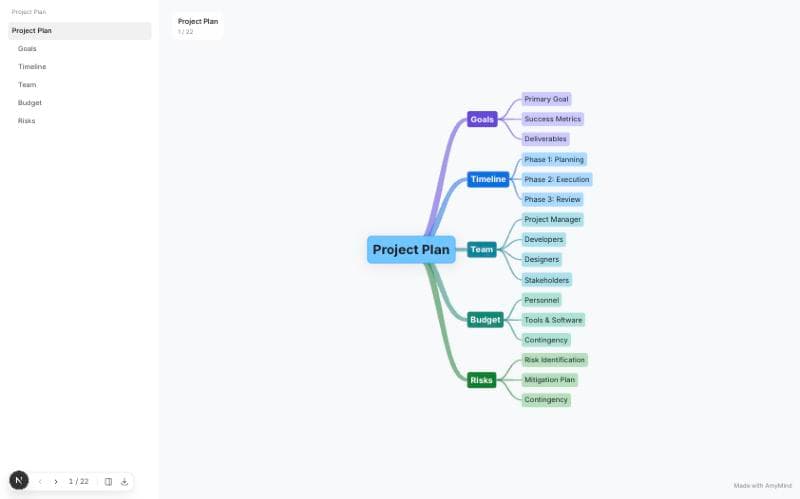
Pitch Mode turns any AmyMind map into a full-screen walkthrough. The structure stays on screen, you move node by node with the keyboard, and every edit shows up in the talk.
You finished thinking in the map. Rebuilding it as slides is the same work twice.
A deck shows one thing at a time, so the audience forgets where it sits.
Change one branch and the deck is out of date before the meeting starts.
Start from text, a PDF, Word, Markdown, or YouTube captions, or open a map you already have.
Pitch Mode opens full screen: the map structure on one side, the current node on the other.
Arrow keys walk the audience through the branches. Esc returns to the editor.
The walkthrough always follows the current map, so the talk stays up to date.
Walk students through a topic without building a deck.
Present the structure of the work, then drill into the branch people ask about.
Keep the whole argument visible while you talk through each part.
| AmyMind Pitch Mode | Slide tools | |
|---|---|---|
| Starting point | The mind map you already have | A blank deck |
| Structure | The whole map stays visible | One slide at a time |
| Editing | Edit the map; the talk follows | Rebuild or re-export the deck |
| Trying it | Free, no sign-up | Usually an account first |
No. Pitch Mode presents the mind map itself. Export to PPT or PDF only when you need a file.
Yes. Leave Pitch Mode, edit the node, and start again. The walkthrough always reflects the current map.
Yes. Maps generated from PDF, Word, Markdown, text, or YouTube captions can be presented like any other map.
A browser. Arrow keys move between nodes, and Esc exits. No presenter remote or extra app.
Generate a map, open Pitch Mode, and present. Free to try, no sign-up.